In SEO world speed is the only currency that matters. If you publish a groundbreaking tool or a time-sensitive blog post. But you have to wait three weeks for a search engine bot to "crawl" your site. That is a death sentence for your traffic. But, don't worry there is a simple and easy way to do this . The IndexNow a protocol designed to give you a direct line to Bing, Yandex, and other major search engines.
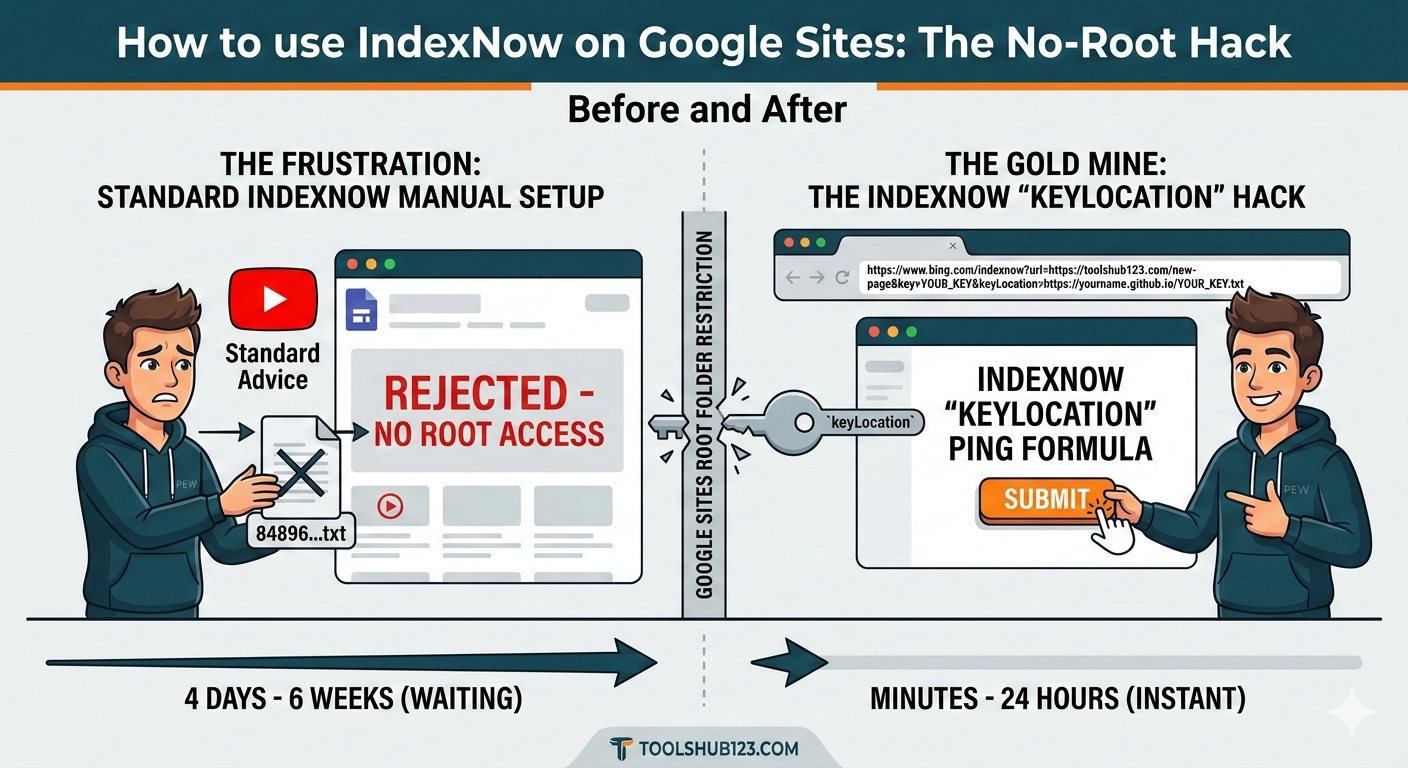
But if you are one of the millions of users hosting your project on Google Sites, you've most likely hit a brick wall. Everybody on YouTube tells you to "Just upload the verification .txt file to your root director". So dose every "pro" guide from Rank Math or Yoast.
The problem? Google Sites doesn't have a root directory. You can't upload files there. You can't use FTP. You are basically locked out of the very protocol meant to help you.
In this guide, we are going to look at the "Developer's Backdoor". The keyLocation parameter and show you exactly how to bypass the root-folder restriction.
What is IndexNow (And Why Does it Hate Google Sites?)
IndexNow is an open-source "Push" protocol. Traditionally, search engines use a "Pull" method: they wander the web, find your link, and crawl it. IndexNow flips the script. You "Push" the URL to the search engine, saying: "Hey, I just updated this. Come get it now."
To prevent spam, IndexNow requires Proof of Ownership. You must prove that you own your domain by hosting a unique API key (a random string of characters) in a text file at the root of your site.
Example txt file: https://yourdomain.com/your-api-key.txt
For WordPress users, this is easy. Plugins handle it. For GitHub Pages users (like my setup for Toolshub123), it's a simple file upload. But for Google Sites, this is impossible. Google Sites acts as a "walled garden." You can add pages and images, but you cannot host a raw .txt file at the root level.
The "Gold Mine" Solution: The keyLocation Parameter
Most people don't realize that the IndexNow API has a fallback for "restricted" hosts. Hidden deep in the IndexNow.org documentation is a variable called keyLocation.
This parameter allows you to tell the search engine: "I am verifying for Site A, but my proof-of-ownership file is actually hosted on Site B."
If you have a custom domain mapped to your Google Site. You can host your key on a free, open platform (like GitHub or even a different hosting provider) and point the search engine there.
Step-by-Step: Implementing IndexNow Without Root Access
Step 1: Generate Your API Key
First, go to the Bing IndexNow Portal and click Generate. You will get a string that looks something like this: 84896d8879b64a0792a482a6352fa98d
Step 2: Create Your "Proof" Server (The GitHub Hack)
Since you can't host the file on Google Sites, you need a "Proof Server."
- Go to GitHub and create a new public repository named indexnow-proof.
- Enable GitHub Pages for this repo (Settings > Pages).
- Upload a file named 84896d8879b64a0792a482a6352fa98d.txt (use your actual key).
- Inside the file, paste the key itself.
- Your proof is now live at: https://yourusername.github.io/84896d8879b64a0792a482a6352fa98d.txt
Step 3: The "Magic" Manual Ping
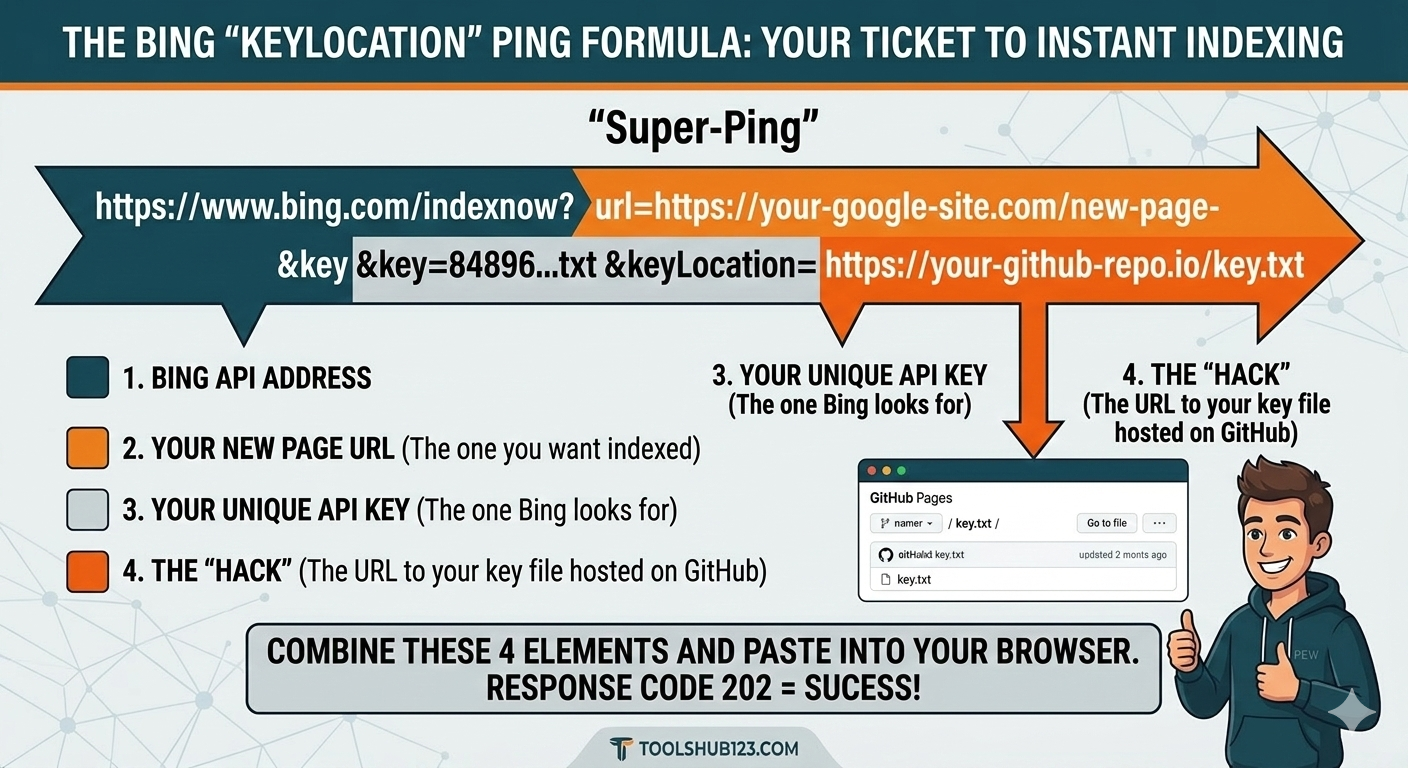
Now, instead of a standard submission, you will use the browser to send a "Super-Ping." Construct a URL following this format:
https://www.bing.com/indexnow?url=https://your-google-site.com/new-page&key=YOUR_KEY&keyLocation=https://yourusername.github.io/YOUR_KEY.txt
Breakdown of the URL:
- url=: The new page on your Google Site you want indexed.
- key=: Your API Key.
- keyLocation=: The URL of the file you just hosted on GitHub.
Paste this into your browser, Bing will see the request, follow the keyLocation link to GitHub. Verify that the key matches, and then proceed to index your Google Site.
Understanding the "202 Accepted" vs "200 OK"
When you perform this manual ping, you need to watch the response code:
- 200 OK: Your URL was submitted, and the key was already verified.
- 202 Accepted: This is the most common response for Google Sites users. It means: "I got your request, but I haven't checked your GitHub 'keyLocation' yet. If it's correct, I'll index the page shortly."
- 403 Forbidden: Your key is wrong, or the keyLocation file isn't publicly accessible.
Why YouTubers Aren't Telling You This
Most SEO content creators focus on the "easiest" path: WordPress. Why? Because itâs easier to sell a plugin or an affiliate link. Explaining the keyLocation parameter requires a basic understanding of API calls and cross-domain verification. These concepts don't always fit into a 5-minute viral video.
By using this method, You are using the protocol the way it was designed for custom-built enterprise systems.
Final Thoughts: The Impact on Toolshub123
When I started Toolshub123, I wanted to prove that you don't need a $100/month hosting plan to rank #1 on Google and Bing. By mastering these "No-Root" hacks, we can keep our overhead low (using free tools like Google Sites and GitHub) while maintaining the same indexing speed as the "big guys."
If you've been waiting for weeks for your Google Site to appear in search results, stop waiting. Generate your key, host your proof on GitHub, and start "pushing" your content to the world.
Check Your Stats First!
Before you start pinging, make sure your on-page SEO is solid. Use our Free H1 Tag Checker to ensure your page is actually worth indexing. A fast index of a bad page is still a bad page!
💬 Comments
Leave a Comment
Comments